


On-page SEO is the bread and butter of any good SEO strategy.
It’s easier to implement on-page changes and get more immediate results compared with off-page techniques, and arguably it’s an area you have more direct control over, so it’s always the best place to start when you’re looking at improving your search engine ranking and gaining more organic traffic.
Let’s delve into the specifics of on-page SEO, and look at the dos and don’ts.
What’s the Difference Between On-Page and Off-Page SEO?
On-page and off-page SEO might sound like technical terms, but actually, they’re quite self-explanatory. On-page SEO should be thought of as anything you can do on the pages of your website to improve online visibility and rankings, while off-page SEO is anything you can do outside of your website to boost SERP rankings.
On-Page SEO Examples
- Content
- Keywords
- Internal and external linking
- Meta tags
- Page speed
- Headers
- Images
- Mobile usability
- URLs
Off-Page SEO Examples
- Social media
- Link building
- Content marketing
- Public relations
On-Page SEO Strategies
On-page SEO is essential for every business that wants their website to rank well on search engine results pages.
So according to my very complex and specific calculations… that’s pretty much everyone.
On-page SEO strategies are designed to make it easier for users to find your website with the help of search engines, and one of the best ways to do this is by improving the user experience. Since search engines prioritise UX, it makes the most sense to focus on this above all else.
This works for your website on two levels, because users will return if they get a good user experience, and new users will find you if Google recognises the good user experience and consequently ranks it highly in SERPs.
To improve your user experience, and implement other on-page SEO strategies to help gain more traffic, you can:
- Write for Your Audience
- Optimise Images
- Include Internal Links
- Include External Links
- Optimise HTML Tags
- Update Your URLs
- Make Your Website Mobile-Friendly
Write for Your Audience
You should always create copy with the intention of giving your users or customers what they want or need. Write with people in mind, not just search engines.
Where relevant, show first-hand experience, subject expertise and clear authorship, and support claims with reliable evidence. Google uses E-E-A-T as a framework for assessing whether content appears helpful and trustworthy; E-E-A-T itself is not a single ranking factor.
When you create content that meets your audience’s needs, this will be rewarded and recognised with better SERP rankings.
Low engagement, weak conversions and few returning visitors can indicate that a page is not meeting users’ needs. Use these metrics to diagnose and improve the page, but do not assume that Google Analytics bounce rate is a direct ranking signal.
On top of this, you’ll also want to consider keywords.
Research and Implement Keywords
Keywords are an important part of any on-page SEO strategy.
They let search engines know what your content is about and therefore enable it to be served to users when it matches relevant search terms.
Researching keywords will help you determine what type of content to create by revealing what search terms are popular, and how difficult it is to rank well for those search terms. Once you’ve settled on your keywords, you need to use them in your content.
Keywords still play an important role in helping search engines understand what your content is about and how it relates to a user’s search query. However, today’s search engines rely more on understanding search intent and topic relevance, meaning your content should cover a subject comprehensively rather than focusing on a single phrase.
You should perform keyword research to gain an understanding of what topics are popular among your target audience, and the level of competition you’ll be up against for ranking for particular keywords.
Once you’ve settled on your keywords, work them into your content naturally rather than force-fitting them in. Keyword stuffing is easy for Google to detect and will hurt your rankings rather than help them.
Use the main topic in the page title, H1 and opening copy when it reads naturally. Include it in later headings only where it accurately describes that section; there is no requirement to repeat the same keyword in every heading.
Structure Your Content
Web page content should be structured to make it easier for search engines to scan, and this also makes it more user-friendly for human readers.
Increasingly short attention spans mean that long essays and difficult-to-digest material are the enemy of a well-ranking website. Instead, break your content up into manageable paragraphs or short sections that are easy to skim read, helping users to quickly find the information they are looking for.
Improving user experience in this way can go a long way to making your website be viewed more favourably in the metaphorical eyes of the search engine.
Using headings and subheadings will break your content down to make it more search engine and human-friendly. Headings (H1) are the headlines of your content, while subheadings (H2) should cover subtopics. H3 subheadings can be used to look at your subtopics in greater detail.
Use H4–H6 when the content genuinely needs deeper levels. The important point is to keep the heading hierarchy logical and consistent, not to stop at H3.
The structure of your site and your content are important to help both Google and your users understand how to navigate it.
Organising your content in a way that is easy to navigate will help search engines determine what you’re about and what your most important areas are. A good site structure also makes it easier to index and can help your rankings on Google.
To structure your site, think about it as a ladder with your main features taking the top spots, and lower priority pages at the bottom.
If you’re selling products, your product pages should be the most important. If you’re a news outlet, the breaking news stories from today are most important. You can help to signal which pages are more important by creating relevant internal links to them from other pages within your site.
Each page of content also needs to be structured in a way that is easy to consume.
This means using headings, and subheadings, and breaking information down into manageable chunks.
Optimise Your Images
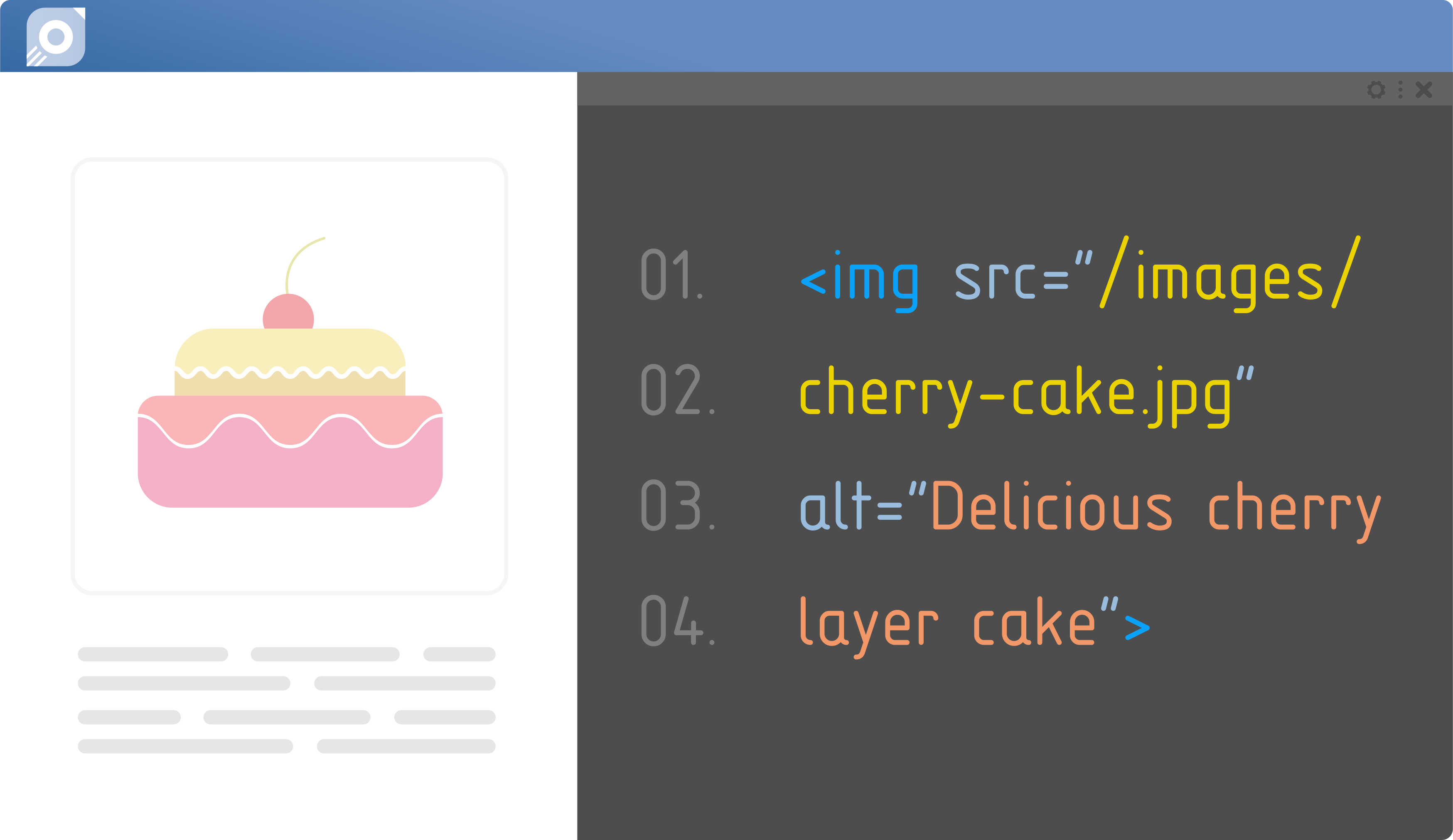
Image SEO is the Brussels sprout of the SEO world; often overlooked and underrated. Like the neglected vegetable, it’s only appreciated by a minority of website owners, and this makes it the perfect opportunity to get ahead of your competitors.
Image SEO, on the other hand, is not quite so delicious, but there is a recipe for success.
Scale Images
The dimensions of your images should be correct before you upload them to your website.
While you can upload them as they are and rely on your CMS to resize them for you, this won’t make the image size any smaller. By setting the correct dimensions beforehand, you avoid the scenario of having needlessly large file sizes, which can slow down your loading speed and affect SERP rankings as well as causing a poor user experience. Find out the ideal pixel size for your image and alter this before uploading.
Compress Images
Fast-loading pages improve the user experience. Google uses Core Web Vitals in its ranking systems, but performance is only one consideration and a faster page is not guaranteed to rank higher.
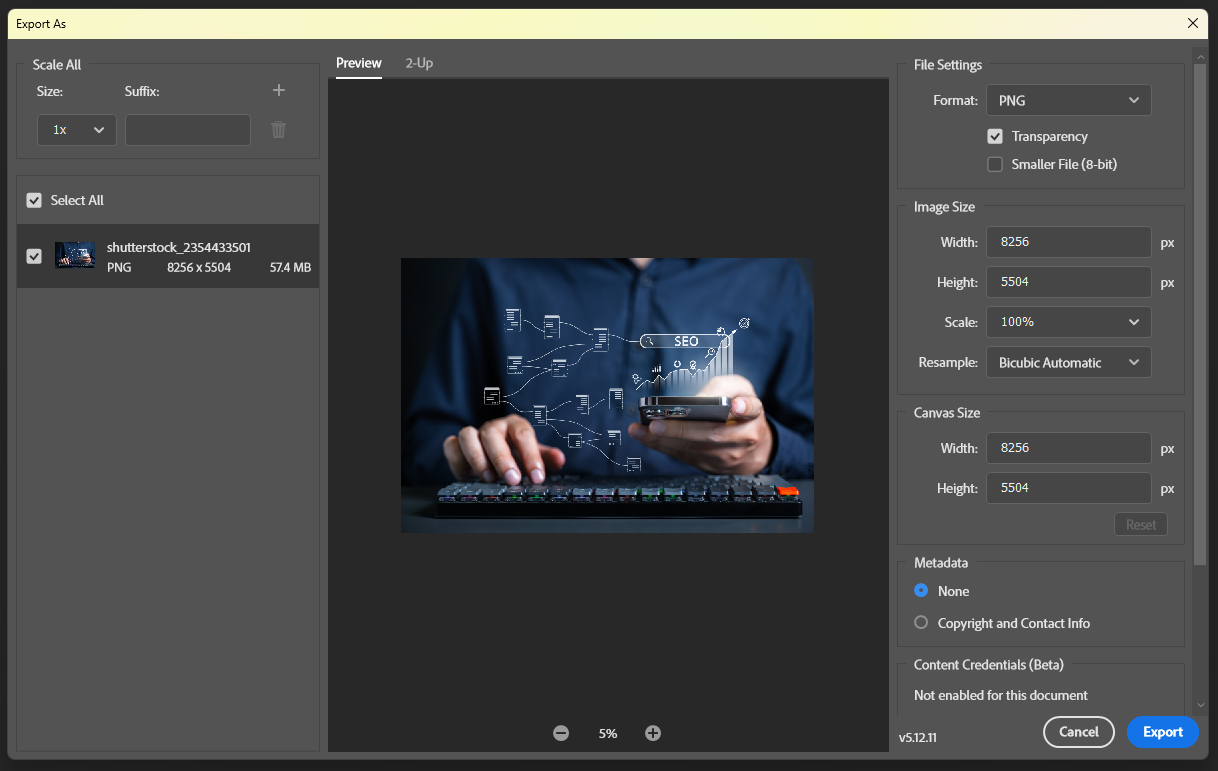
Large image files can negatively impact loading speed, and while altering the dimensions before uploading can help with this, it isn’t always the answer. For pages that have a lot of images, consider compressing images to reduce size and loading time without affecting image quality. Some website plugins enable you to compress page images in bulk, or alternatively you can use tools for individual image compression.
Don’t Forget Alt Text
Alt text is the words used to describe an image, and it serves two important purposes.
First off, the text can be helpful to visually impaired users who are unable to see the image, or it can describe the image to users who cannot load the image.
Secondly, the alt text helps crawlers ‘read’ your image to understand what it’s about, which will positively affect rankings. Google itself explains the significance of alt text, stating “the most important attribute when it comes to providing more metadata for an image is the alt text”. When creating alt text imagine you are describing the image to someone who can’t see it. A few words are rarely enough; be useful and concise.

Fitting File Names
Using appropriate file names helps to give search engines clues to what your image is about. Similarly to alt text, this helps Google read your image and appropriately index it, boosting search rankings.
Avoid using generic file names for your images such as ‘image0045.jpg’, which give no indication to search engines what the image could represent. Instead, name files according to their subject matter and use hyphens or underscores to separate words, for example, ‘convertible-red-car.jpg’.
Consider Captions
In many cases, web pages are structured in a way that makes the images self-explanatory. For example, on a fashion product page selling a jacket it would be unnecessary to caption the image ‘brown jacket’. However, there are some instances where captions can be useful to help users and crawlers understand the context of the image.

Use Original Media
Original images, diagrams or data visualisations can make a page more useful and distinctive when they add genuine value. Google does not state that an image ranks better simply because it is original, so choose media for its relevance, quality and usefulness rather than assuming an automatic ranking advantage.
Sitemap Images
Google recommends using a sitemap for images to help ensure they get found. You can add image sitemap tags to your existing sitemap, or create a new sitemap purely for your images. Either of these image SEO options work well for Google.
Use Supported File Types
In order to ensure a good user experience with images that load properly and are not blurry, you need to be using image formats that are supported. BMP, GIF, JPEG, PNG, WebP, AVIF and SVG files are all supported by Google. Ensuring the extension of your file type matches the name of your file will also help to eliminate loading issues.
Utilise Keywords
Keywords are not just for written content, they’re also useful for images. Including keywords in your image file names or image alt text will help the images get found in a Google image search, which is another way to increase organic traffic to your website.
Include Internal Links
Internal links are hyperlinks within content that point to other pages on the same website.
They are useful for helping search engine crawlers find and index more pages from your website, and they also work as signals to help search engines determine how the pages in your site relate to each other.
Both of these factors contribute to helping a website rank better on search engines. Internal links also serve as a way of helping users find more relevant content, and ultimately keep them on your website for longer.
Create links in your content that point to other relevant pages on your site to help your users find the information they’re looking for, and to direct Google crawlers when they’re indexing your site.
Internal links can encourage readers to stick around on your site for longer, giving you a better chance of conversion. They also work as a means of navigation for your site.
Include External Links
External links are hyperlinks within the content of a website that point to other websites.
External links can help readers verify claims, explore supporting evidence and reach the original source. Use them when they genuinely improve the page; linking out is not, by itself, a direct route to higher rankings or greater authority.
When including external links in your content, be sure to only use recognised and respected websites, and avoid stuffing the content with links because this can look spammy and be off-putting for readers.
Use Outbound Links to Support the Reader
When citing research, statistics, quotations or guidance, link to the original source where possible. Use descriptive anchor text and review older links periodically because destinations can change.
Judge each link by its relevance, safety and usefulness. Qualify sponsored or paid links appropriately, and avoid misleading, malicious or unrelated destinations. There is no benefit in adding external links simply to meet a quota.
Optimise HTML Tags
Your HTML tags, such as title tags and meta descriptions, can be optimised to improve your on-page SEO.
Title tags should be relevant to your content and include your main keyword, while meta descriptions should tempt potential visitors to click through to your site.
Title Tags and Meta Description Optimisation
Click-worthy title tags and meta descriptions can increase traffic to your website from search engine results.
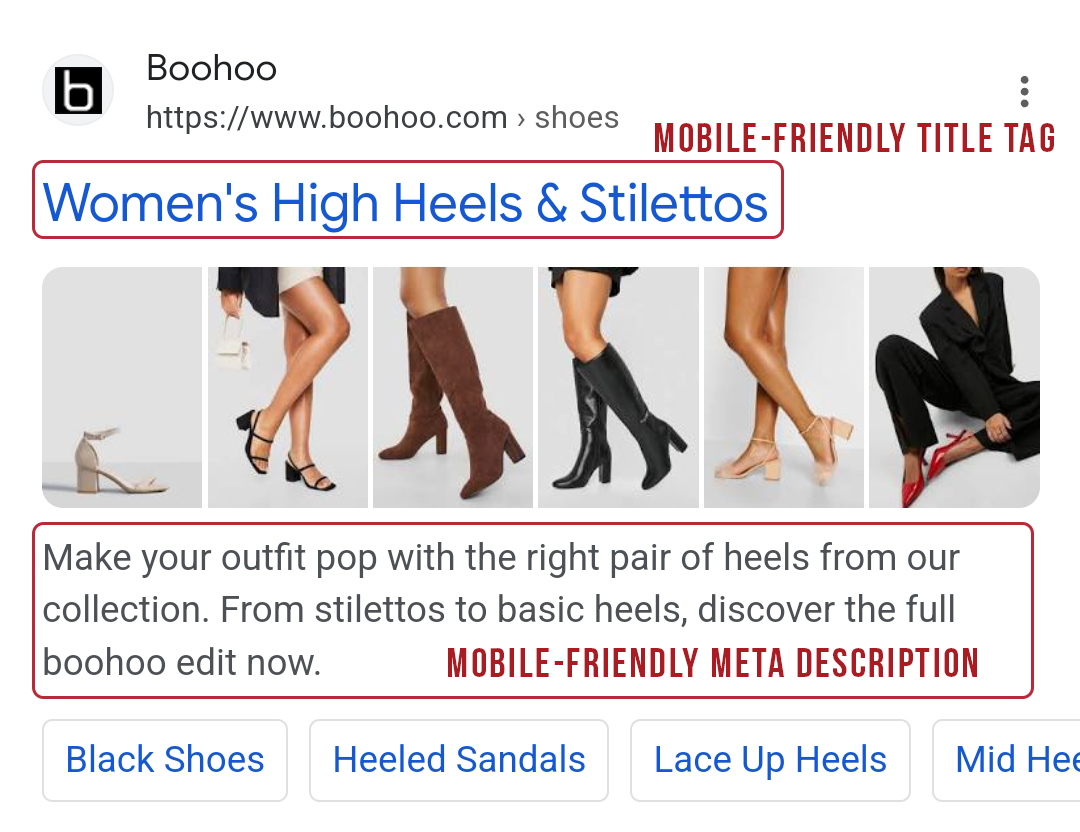
There is no fixed character count that guarantees a title link or meta description will display in full. Write a unique, descriptive and concise title, then use the meta description to summarise the page’s most useful information. Google may generate different text and truncates search results when needed to fit the available space.
Update Your URLs
URLs help search engines understand what a page is about, and therefore with an optimised URL your page is more likely to be considered for a relevant search query.
Often, websites will automatically create their own URLs for new content, so it is imperative that you change these before new pages are published. Avoid whole sentences, publishing dates, and random numbers.
Instead, incorporate hyphens to separate words so they are more easily readable, use your keyword, and ensure the URL is relevant to the page.
Make Your Website Mobile-Friendly
People use websites across phones, tablets and desktop computers, so pages should work well at different screen sizes. Avoid relying on one broad device-use statistic: the split varies by audience, market and data source.
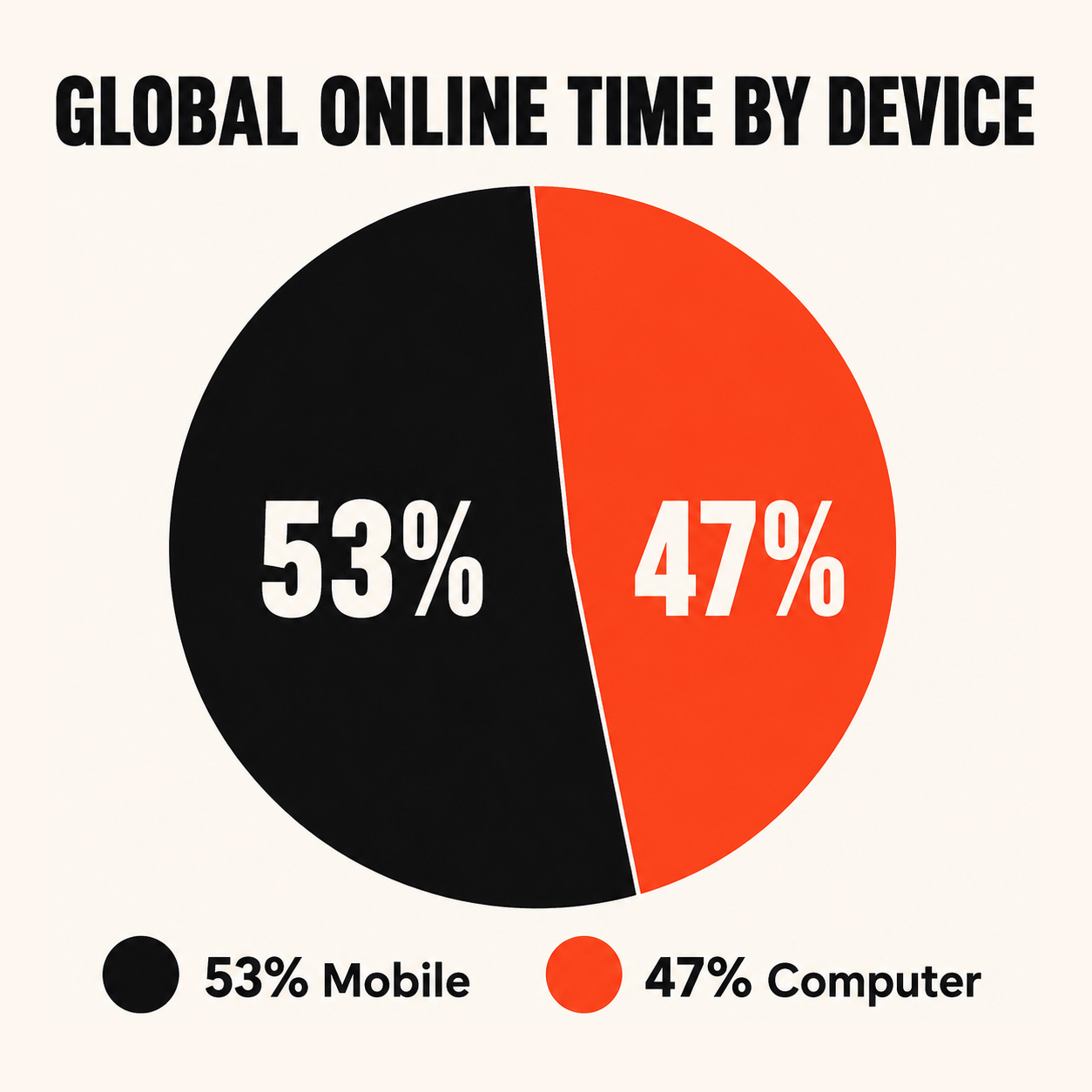
In fact, Google now prioritises the mobile version of a website with mobile-first indexing. If your SEO isn’t up to scratch on your mobile site, your ranking is at risk.
Is Your Site Mobile-Friendly?
You can check if your website is mobile-friendly using Google’s PageSpeed Insights. This free SEO tool will tell you if there are any issues with your mobile site, for example, if there are links too close together.
You can then use this information to make updates to your site to enhance the user experience on mobile.
Configuring Sites for Mobile
When configuring a website for mobile you have three main options. These are responsive web design, dynamic serving, and separate URLs. Let’s look at each of these options and assess how they compare to each other:
Responsive Design
Responsive design is a method of configuring your site for mobile that’s considered the easiest to use from both a developer and user point of view. It’s also the type of configuration that’s recommended by Google.
With a responsive design, you can deliver the same page to both desktop and mobile users.
The HTML code remains the same, but the CSS automatically alters how the page looks on each device, rendering it in a way that is most appropriate for the screen size. This can decrease load time because it means users don’t need to be redirected based on their device, and it also means pages can be shared using a single URL rather than a mobile-friendly URL.
Responsive designs also minimise the chance of mistakes appearing on mobile sites, and they are significantly easier to maintain compared to alternative options.
Dynamic Serving
With dynamic serving, the URL remains the same, but the HTML changes depending on the user’s device.
If you’ve ever been directed to a desktop version of a website on your mobile device, even though a mobile site exists, this was a result of dynamic serving. It’s fairly common for the wrong version of a website to mistakenly appear, which of course is a thumbs down for user experience.
Separate URLs
You can have separate URLs for your mobile and desktop sites if you want the two sites to appear distinctly differently.
Typically this involves using the word ‘mobile’ or simply an ‘m’ in the URL designed for use on mobile devices.
For example, the desktop URL could be yourwebsite.com, while the mobile-friendly version could be mobile.yourwebsite.com.
This option of mobile configuration is not recommended by Google, since it can cause plenty of SEO issues that take time and effort to resolve. Most notably, it requires HTML tags to be correctly used to communicate to Google which pages are for mobile and which are for desktop, otherwise, content can be assumed to be duplicated. This can harm your SERP ranking, and create an unnecessary job for your website manager or developer.
Tips for Mobile SEO
To ensure your website is mobile-friendly, consider trying out these top tips:
Mobile-Friendly Content Creation
When you’re creating content for your website, have mobile users in mind.
Since mobile devices have smaller screens than desktops, the information a mobile user sees will be quite different from that of a desktop.
A paragraph that looks manageable on a desktop might look like an essay on a mobile device. Aim to keep sentences short to make content easy to read on a mobile.
Headers and subheaders will also make it easier for mobile users to skim content. Remember to break up paragraphs with empty space and images so your readers don’t feel overwhelmed with text.
Page Speed
Page performance affects user experience, and Google uses Core Web Vitals in its ranking systems. Relevance remains more important, so treat performance as part of the overall page experience rather than a shortcut to higher rankings. You can check your page using Google’s PageSpeed Insights.
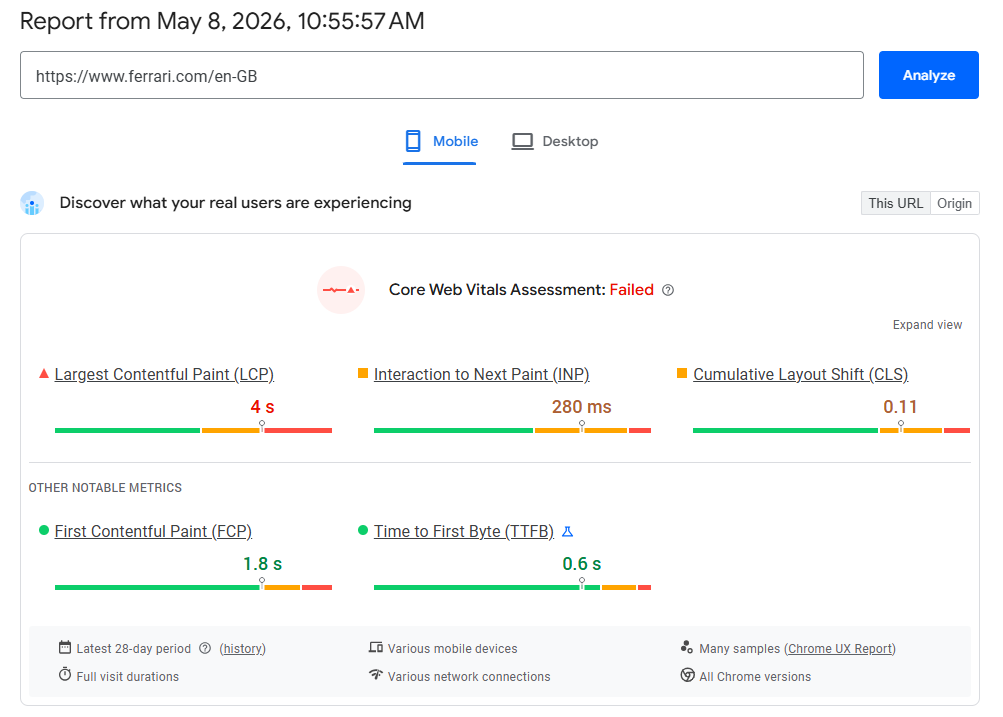
Simply input your URL to get an audit of how fast your website has been loading on both mobile and desktop devices.
Answer Conversational Searches
People sometimes phrase spoken searches as complete questions. You do not need a separate voice-search strategy. Instead, identify the questions your audience genuinely asks and answer them clearly using natural language.
Users typically use a more casual approach when using voice searches compared with a typed search.
For example, when typing a search into Google you might input ‘pizza delivery near me’, whereas when using the voice command you might say something like ‘where is the nearest pizza delivery place to me’. This change in user behaviour can mean long-tail keywords are more effective for mobile SEO.
Avoid Pop-Ups
On mobile devices, pop ups can completely dominate the screen and damage the user experience. For this reason, pop-ups are usually best avoided on mobile devices, unless they only occupy a small portion of the screen.
Since Google prioritises user experience, the use of pop-ups can negatively affect your SERP ranking, and of course dissuade visitors from coming back to your site.
To Sum Things Up
On-page SEO is what most website owners or developers concern themselves with when they’re optimising a website. It forms the foundation of any good SEO strategy, and it covers a multitude of areas.
If your site is lacking in any of the on-page SEO areas mentioned above, it’s time to delve deeper into that area and see what changes you can implement to improve your SEO game.
Since this process can be time-consuming, it’s always helpful to have an SEO specialist on hand to keep things running smoothly. Get in touch today.
