


Technical SEO has gotten more complex because of many things: choice of hosting, different website platforms, how often content changes, and even what Google displays on its results pages.
And the good news is that AI isn’t that different from Google. A technically well-optimised website helps both understand and surface your content more effectively.
Therefore, maintaining your website’s overall performance can be difficult without a technical SEO checklist, especially for those just starting to learn SEO. To help you out, in this post we’ll explain the basics so that you can do it yourself! While many still choose to hire an expert, it is important to have a good understanding of what they are doing, to ensure they are working how you would like them to.
What Is Technical SEO?
As you are reading this article, you probably already have a basic understanding of technical SEO and what it means. Primarily, it is the optimisation of the structure of a website in order to increase its chances of ranking well on search engines such as Google.
While SEO has become popular in recent years, technical SEO has been happening for a while – perhaps just under different names. For example, as far back as 2002, when the internet was a much smaller place, researchers from the University of Nebraska looked into the issue of link rot. In an article from Wired, they described how they noticed their hyperlinks were disappearing when writing their courses online. By tracking the losses, they found that around 25% of their links disappeared – which then led to them looking into technical SEO to solve these issues.
Technical SEO Terms You Need to Know
There are hundreds of terms within technical SEO – and this can become overwhelming! To help you out, here are some of the most common terms that come up. If you look at these components and add them to your backend, it can lead to increased traffic to your site.
- Page Performance & Core Web Vitals
- Website Navigation and Crawl Depth
- The structure of URLs and Breadcrumbs
- Crawl Errors
- Dead Links
- Schema Markup and Rich Snippets
- XML Sitemaps and Crawl Budget
- robots.txt
Technical SEO Checklist
Content is the most important part of SEO. It allows customers to see what the business is about and shows what value it can bring to the table. If the content of a website is good, the foundation is built for a good website. Plus, you’re less likely to be impacted by a Google update, because if your site constantly maintains good overall health, the chances of that happening are significantly reduced.
But wait, shouldn’t we be talking about technical stuff in this post? Absolutely!
We will use content as a starting point and show you how technical SEO is wrapped around it.
Because technical SEO is not here to put your content in chains. It’s here to help your content reach the target audience and communicate messages in a clear way.
And regardless of whether you are running an SEO campaign for an established brand or working on SEO for a startup, the same rules apply.
Crawling and Indexing
There are so many areas of SEO that it’s easy to lose sight of your priorities. Technical SEO, as the foundation of any SEO, needs to be considered first and foremost. Within technical SEO, the most effective thing you can do to improve website ranking is to focus on crawlability and indexing.
Overhaul Your Crawl
Crawling is how search engines find your website and web pages.
They use bots or spiders to crawl through web pages and use the links within the pages to crawl to other pages.
If your website isn’t crawlable, then you’re not going to get found by search engines, and therefore you aren’t going to appear in their results pages.
So, how do you improve crawlability?
There are a handful of ways you can make your website more accessible to crawlers, and encourage more frequent crawler activity, including:
Keep It Mobile-Friendly
Search engines tend to prioritise websites that are mobile-friendly, so ensuring you have a responsive design for mobile devices greatly improves your chances of being crawled.
Add Internal Links
Crawlers use links within website content to find new pages, which subsequently get indexed, so internal linking is an excellent way to ensure other pages on your site are getting found by search engines.
You can sift through your content and manually link to other relevant pages on your site, or you can get SEO tracking tools to help with this, which can quickly locate opportunities for internal linking.
To create internal links you simply need to find a few words within content on your website that is relevant to another page on your site.
For example, if your website deals with recipes, your content for a BBQ chicken pasta recipe may state that it’s one of your favourite BBQ-inspired dishes. Now you can link the phrase ‘BBQ-inspired dishes’ to another page on your website that features BBQ-inspired recipes.
Speed It Up
Website speed is important to crawlers. If your pages are slow to load, a crawler can lose interest and give up before it adds the page to the index. For optimum crawling, you need to ensure your website is running at an optimised speed.
So now we come to…
Page Performance and Core Web Vitals
The performance of the page is not the same as its speed. Performance is all about the way that the user can use a website, making sure it is loading smoothly on a 4G network and is easy to access. Web vitals are the best way to ensure that the page performance is high.

Ideally, you want the page to load quickly so the user can access it – within a couple of seconds. This ensures that the customer is more likely to stay and browse the webpage, and not leave and look for another website. This is closely related to Largest Contentful Paint (LCP), which measures how quickly the main content becomes visible.
Once the FCP is in place, we need to offer more, and quickly.
Thus, we address Interaction to Next Paint (INP). INP measures how quickly a webpage responds to user interactions such as clicks, taps, or typing. It considers all interactions during a visit and reports the slowest one (excluding outliers), giving a more accurate picture of real user experience. A lower INP means the website feels more responsive and smoother to use.
Largest Contenful Paint, or LCP for short measures how long it takes for the main content on your page (text or image) to fully load so that it can be accessed by the user. The three metrics of FCP, LCP and CLS have to be optimised in order for your article to rank highly.
Now, it’s important to note that sometimes there can be issues with your site such as plugin or hosting issues, which is why this metric is generally tracked over an average of 28 days to get a clear picture of how fast the page loads. Small issues will not impact this in a major way, it’s more about performance over time.
Case Studies
Blackwell House
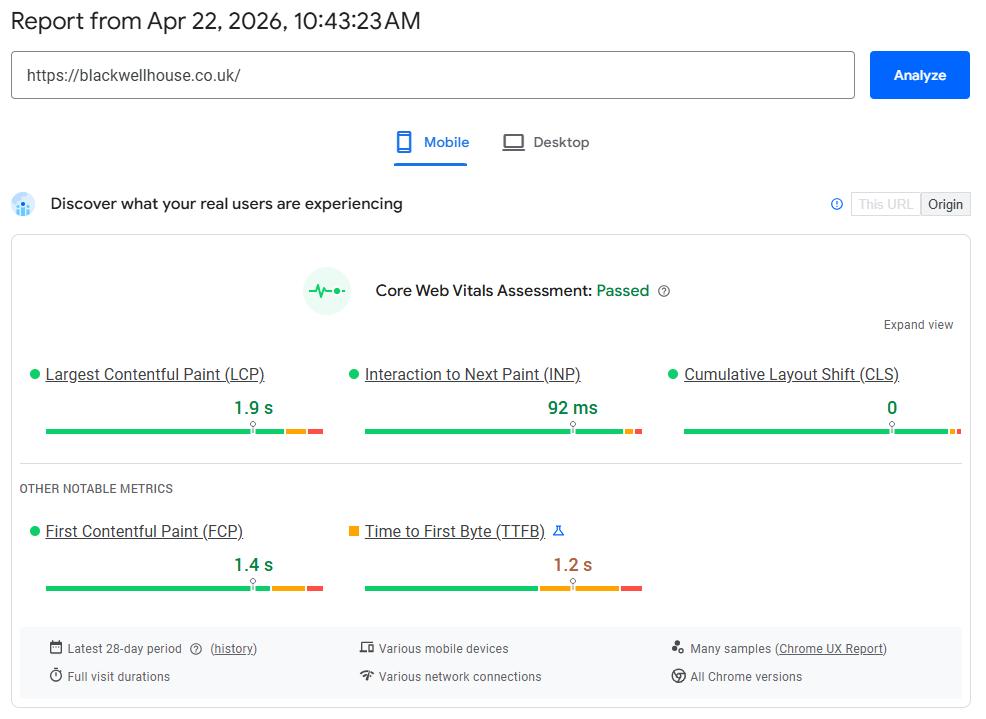
Real-world results from a recent five-star hotel project. Using Google PageSpeed Insights,
we improved performance to meet Core Web Vitals across mobile – helping deliver a faster,
smoother experience for users. See the full Blackwell House case study.
Mega Golf
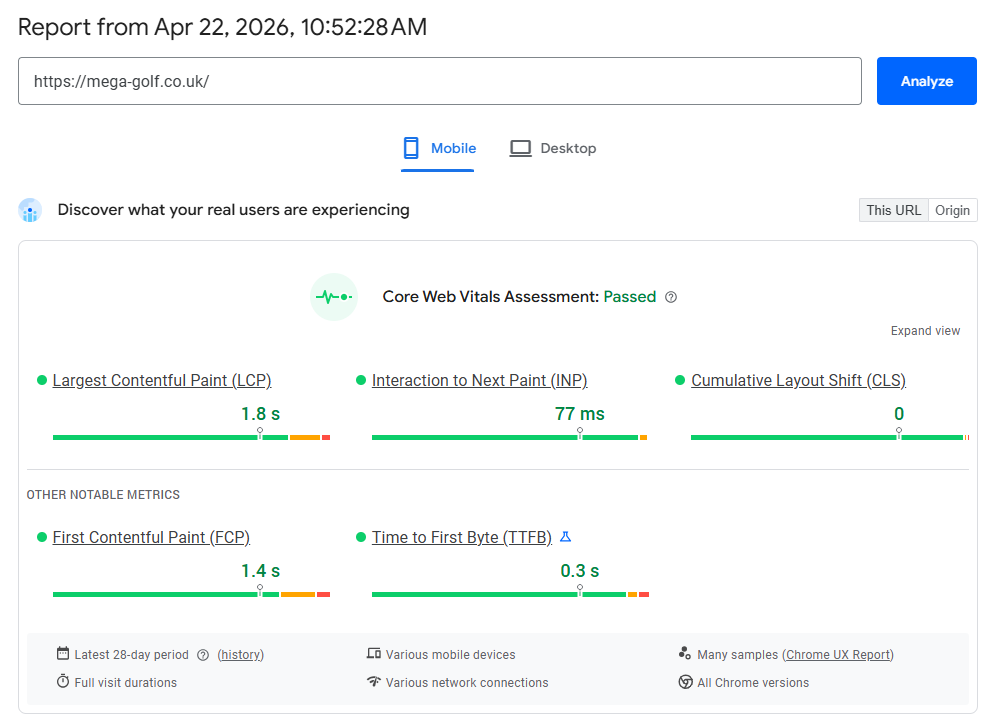
Bonus tip: apart from Core Web Vitals, ensure your Cumulative Layout Shift (CLS) is also good (green). CLS quantifies the extent to which webpage content unexpectedly shifts or “jumps” during loading. This is particularly important for your SEO.
To help improve your CLS score, ensuring that you have a good hosting website is the first step. Platforms like WordPress or Shopify are known for their great reputation. On top of this, the website has to be built well. While you may find yourself using apps or plug-ins to design your webpages, unless it adds value – don’t include it. This is because the more that you have, the more you need to maintain the page.
Website Navigation and Crawl Depth
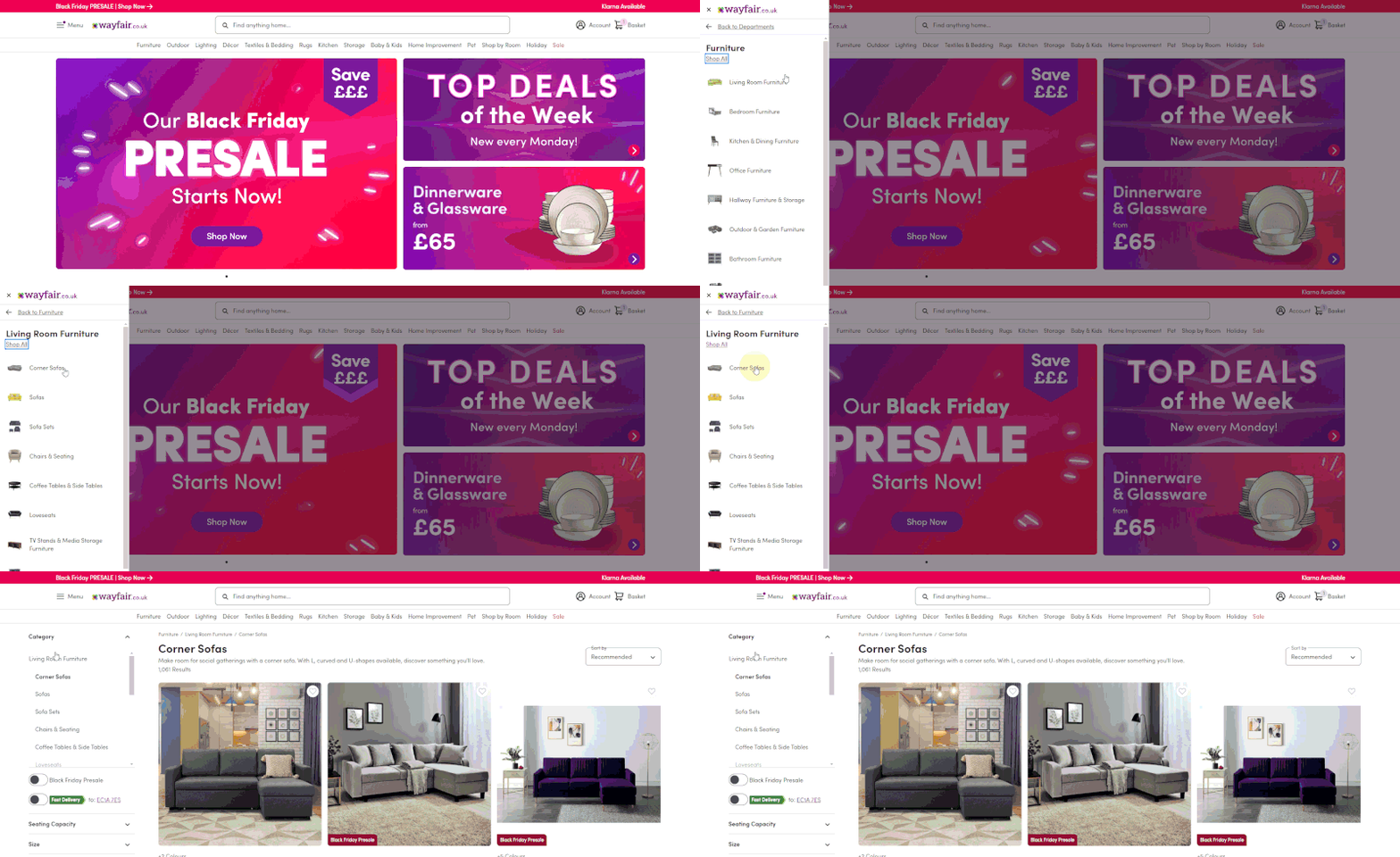
When navigating a website, there is something called the three click rule. This rule means that a visitor to the website should be able to find whatever information they are looking for within three clicks of the mouse. Any more than this, and the website is too complicated and not great for visitors to use.
Read also: WordPress SEO Tutorial
If your website is on the larger side and requires a few more clicks for users to get where they want to go, don’t worry too much, as Google will take the size of your website into account. Therefore, there are some exceptions to this rule so it might not be as important as some of the other features on our list. If you do have a smaller website, however, try and stick to these guidelines.
URL Structure and Breadcrumbs
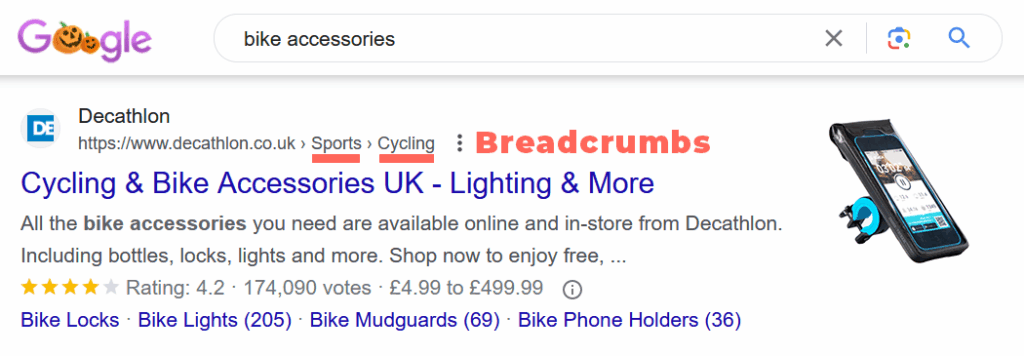
When possible and if the platform permits, align your URLs with your breadcrumbs.
Let’s take Decathlon as a simple example.
- Page Name: Bike Accessories
- URL: /sports/cycling/bike-accessories/
- Breadcrumb Path: Home > Sports > Cycling > Bike Accessories
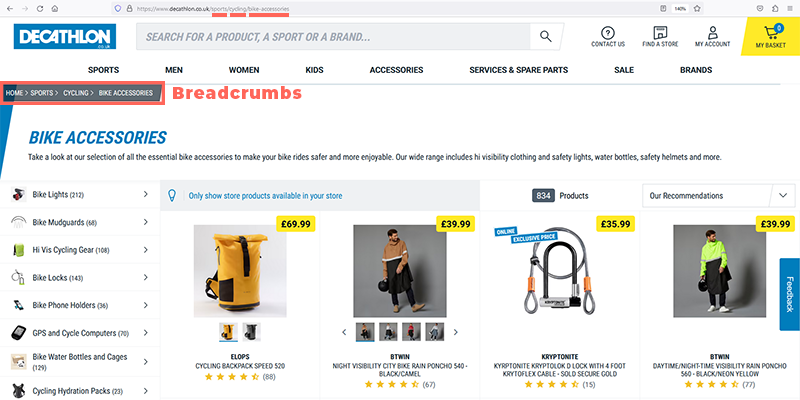
This is a great example of a neat URL that matches the page path. If you’re not convinced, just check out the first page of Google when you search “bike accessories” and see their listing.
Crawl Errors
Use Search Console for identification and resolution. Until fixed, Google will ping those outdated URLs. The risk? Potential visitors may do the same. Consider the scenario where an externally linked URL, which you’ve removed, directs a user to a 404 page. This not only damages SEO but your brand image as well.
Dead Links
Whether internal or external, dead links compromise the browsing experience. Use tools like Screaming Frog to identify and fix all dead links.

Schema Markup and Rich Snippets
Schema is a shared vocabulary amongst the major search engines, which was developed to help them better understand websites.
Using schema markup on your website is a way to give search engines more details about your content.
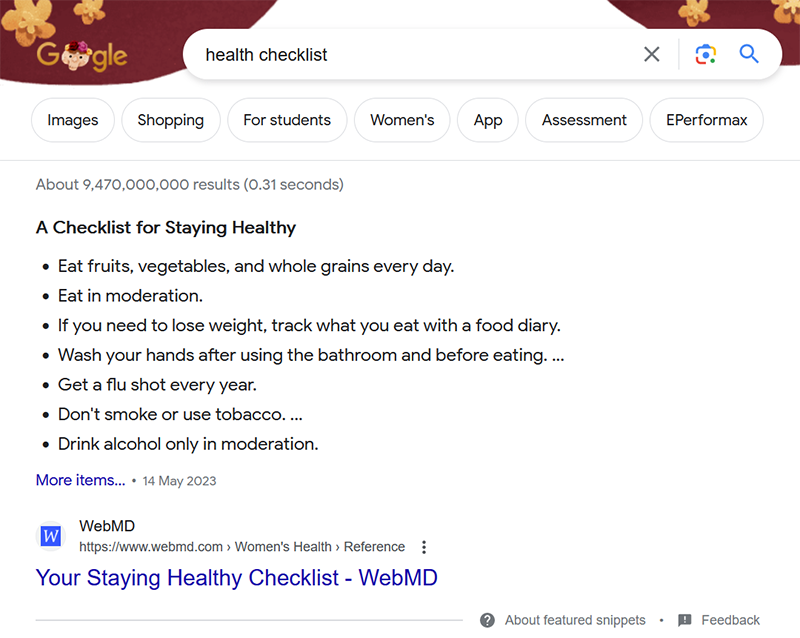
Think of it as giving clues to search engines so they can display your website’s information in a more attractive and informative way. For example, if you have a movie website, you can use a movie snippet to show key details like cast and release date.
If you are using your website to sell products, product snippets can include all the key information you need such as prices and customer review ratings. Cooking websites can also create recipe snippets with ingredients and photos of the food to entice browsing consumers.
Pro tip: Use Schema Markup Validator Tool to help validate your page schema and optimise it for any Search Engine.

XML Sitemap and Crawl Budget

An XML sitemap is like a roadmap for search engines; it allows them to understand which web pages on your site you want to be highlighted to search engine users. Think of this as simply bookmarking pages to highlight what bits have the most important information for potential customers. If there are pages you don’t want indexed, use methods like noindex or canonical tags. Sitemaps help search engines discover pages, but they don’t control indexing.
Ensure It’s Secure

Secure websites rank better than those that are not secure. An SSL certificate allows you to implement HTTPS on your site, which is the gold standard of a safe website according to search engines.

Index Flex

The reason technical SEO gets so hung up on crawling is because of what happens as a result of crawling.
When bots crawl a page on your website, they add it to an index, which is essentially a catalogue of information that helps search engines decide which pages are relevant when a user inputs a search term.
By ensuring good crawlability, you’re increasing your chances of getting indexed by search engines, and therefore increasing the likelihood of turning up in SERPs.
robots.txt
Robots.txt is like a doorman for your website because it lets the search engines know what web pages they can enter. This, like the XML basically highlights to the search engine which pages to focus on.
Some common types of pages that are often not allowed by Search Engines include:
- Admin pages: These pages are for admin to help manage the website. They are not customer-facing web pages so should be excluded from searches.
- User profiles: If you have a community or membership website, you will have a number of different user profiles. These should also be kept private and should not be searched.
- Search result pages: These pages are created when users are using the search function on your own webpage. This can lead to redundant search results on Google.
- Temporary pages: If you have a page that you are currently working on, it is best that it isn’t customer facing yet, so exclude these pages.
- Sensitive content: Any webpages that contain confidential information are kept by the public.
- Duplicate content: Repeat pages can lead to SEO issues, so multiple versions of the same page should be avoided.
- Files and directories: If you have PDF files on your webpage, or directories that the public doesn’t need to see, these can also be included in robots.txt.
Just remember that if you block a page through robots.txt, it doesn’t mean that nobody can access it. It just means search engines won’t display it. If someone has the actual URL of the page, it can still be accessed.
Conclusion
So why is technical SEO so important? Simply because, if you want to rank on Google, you have to have it. This can include all the factors we have discussed above including functional links and FCP. If you don’t have technical SEO, the webpage is worse for potential customers, and they are likely to look elsewhere. Google wants to please its users, so they put the best sites first.
Look at your page using our advice above to help try and work out where it can improve. You can work on this and improve the technical SEO on the page to help you rank higher on search engines like Google.
Contact us today to take your website to the next level.
